uniapp项目H5发行(发行->网站-PC web或手机H5)打包后
如果要给项目封装一个请求,但请求地址必须读取配置文件,从配置文件中拿地址,后续随时更改配置文件,直接让请求地址发生变化。
解决方案
核心思路:利用打包后的index.html文件,原生<script>引入配置文件,在全局可调用。
uniapp 官方解决方案(建议看一眼):
- 建立一个
config.js配置文件:var config = { defaultUrl: "https://c3test.dassoft.cn", tenantCode: "admin" }
保存到桌面上即可,无需放到项目中。 - 在项目根目录新建
temp.h5.html空文件,cli创建的话同理 - 打开
temp.h5.html复制以下模板代码,<script>引入配置文件:1 2 3 4 5 6 7 8 9 10 11 12 13 14 15 16 17 18 19 20 21 22 23 24 25 26 27 28 29 30 31 32 33 34 35<html lang="zh-CN"> <head> <meta charset="utf-8"> <meta http-equiv="X-UA-Compatible" content="IE=edge"> <title> <%= htmlWebpackPlugin.options.title %> </title> <!-- Open Graph data --> <!-- <meta property="og:title" content="Title Here" /> --> <!-- <meta property="og:url" content="http://www.example.com/" /> --> <!-- <meta property="og:image" content="http://example.com/image.jpg" /> --> <!-- <meta property="og:description" content="Description Here" /> --> <script> var coverSupport = 'CSS' in window && typeof CSS.supports === 'function' && (CSS.supports('top: env(a)') || CSS.supports('top: constant(a)')) document.write('<meta name="viewport" content="width=device-width, user-scalable=no, initial-scale=1.0, maximum-scale=1.0, minimum-scale=1.0' + (coverSupport ? ', viewport-fit=cover' : '') + '" />') </script> <link rel="stylesheet" href="<%= BASE_URL %>static/index.<%= VUE_APP_INDEX_CSS_HASH %>.css" /> </head> <body> <noscript> <strong>Please enable JavaScript to continue.</strong> </noscript> <div id="app"></div> <!-- built files will be auto injected --> <script language="javascript"> //使用了 sessionStorage和时间戳,这样可以防止 js和css的缓存,页面会话刷新时间为半小时 var timestamp = new Date().getTime(); var versionStamp = sessionStorage.version; if (versionStamp == null || (timestamp - versionStamp) > 1800000) { sessionStorage.version = timestamp; } document.write('<script src="./config.js?v=' + sessionStorage.version + '"><\/script\>'); </script> </body> </html>``` - 提前写好获取配置文件的代码(在哪里用配置文件就在那里写)
export const defaultUrl = config.defaultUrl;
开发中,可以先写死参数,后续要打包后在变更。 - 打开
manifest.json文件,将temp.h5.html关联: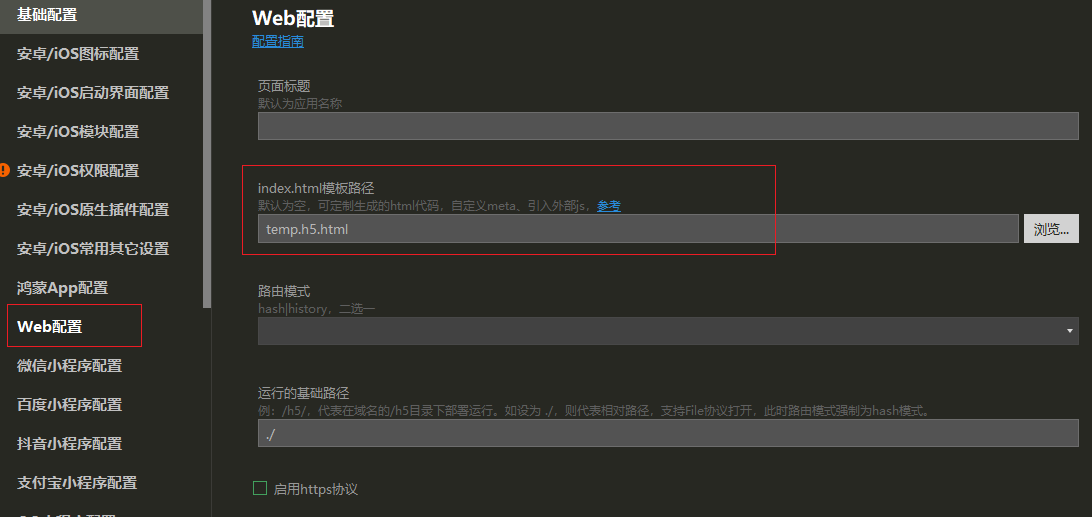
- 都配置好后,执行编辑器菜单->发行->网站-PC web或手机H5,进行打包:
打包完成后,把
h5目录复制到桌面,如下图所示文件夹位置。
- 将配置文件
config.js加入到根目录,确保与index.html同级 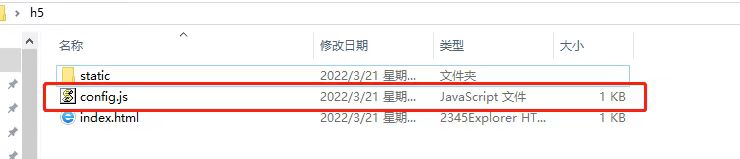 此时
此时index.html中的<script src="./config.js>就能正确找到配置文件,从而实现读取。 可以改变config.js文件配置,然后刷新浏览器页面,查看是否更改。